Cinematic Double Exposure Portrait Prompt for Men
AI image generation has made it possible to transform a simple personal photograph into a professional-looking editorial portrait with only a well-written prompt. One of the most effective styles for creating this kind of visual is the cinematic double-exposure portrait, where a realistic subject is combined with a large monochrome version of their own face in the background.
This prompt is designed to create that premium fashion-editorial effect while maintaining the recognizable facial characteristics of the person in the reference image. Instead of simply changing the background or clothing, the prompt builds an entire studio environment around the subject.
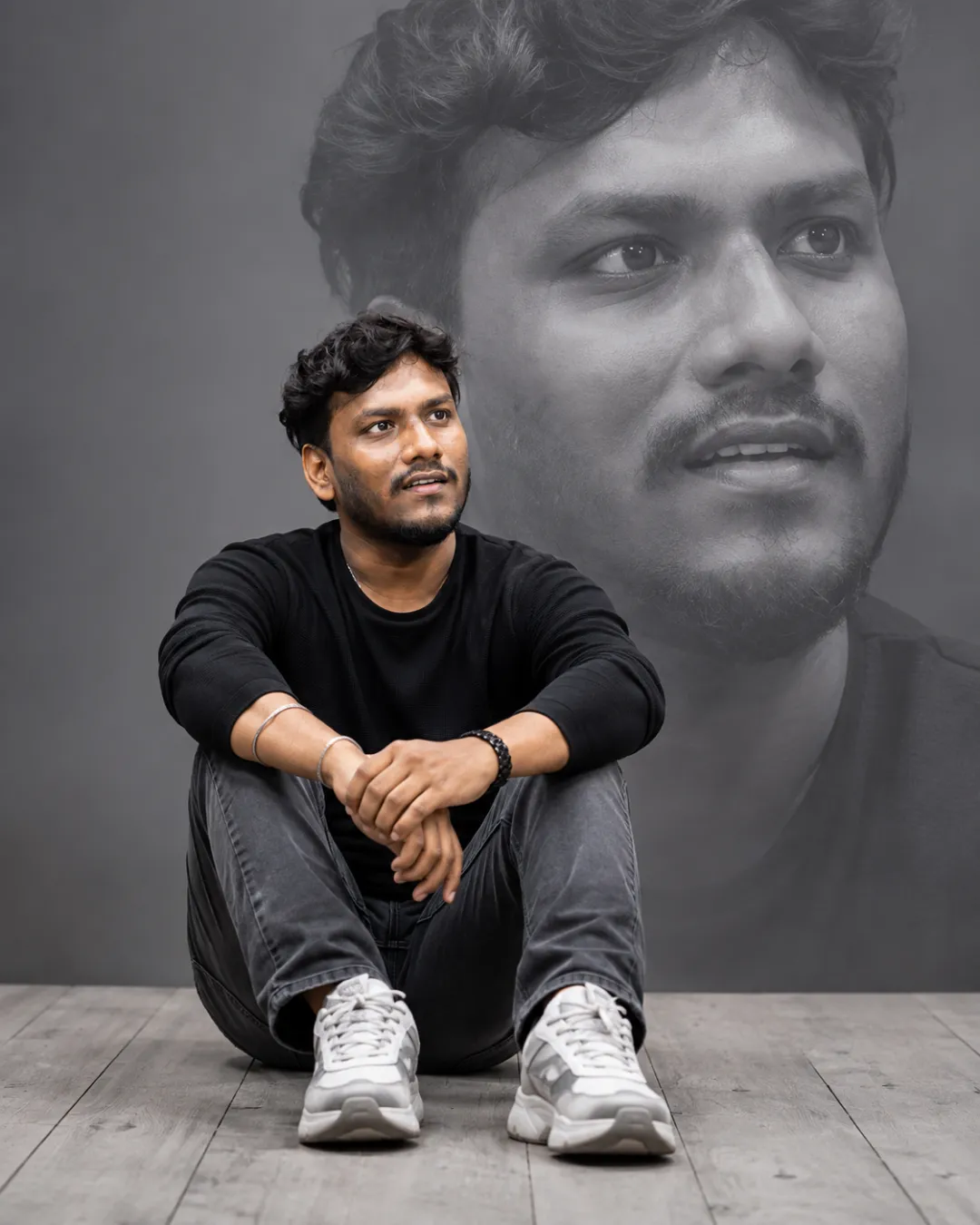
The main composition features a man sitting casually on a light-gray wooden floor while a large monochrome close-up of his face blends into the background. Soft directional lighting, realistic skin texture, muted colors, modern clothing, and cinematic depth help create the appearance of a professionally photographed fashion campaign.
This AI portrait prompt is useful for creators, designers, photographers, social media users, personal branding projects, portfolio images, and anyone looking to turn an ordinary portrait into a visually striking editorial photograph.
Key Features of This AI Portrait Prompt
The biggest strength of this prompt is its layered visual composition. Rather than generating a standard portrait, it asks the AI to combine multiple photographic elements into one coherent scene.
The first major element is facial identity preservation. By asking the AI to use the attached reference image, the prompt attempts to maintain the subject's recognizable facial structure and natural proportions. Using a clear reference photograph can help produce a result that feels more personal and realistic.
The second element is the cinematic studio environment. The cool-gray background and light wooden floor provide a neutral setting that allows the subject to remain the main visual focus. The restrained color palette also gives the image a premium editorial appearance.
Another important feature is the double-exposure effect. A large monochrome close-up of the same person's face appears behind the main subject. Instead of making this background portrait look like a separate image, the prompt instructs the AI to blend it softly into the studio backdrop.
The clothing also contributes to the overall visual style. A fitted black long-sleeve top, charcoal-gray jeans, and chunky white-and-gray sneakers create a modern fashion aesthetic without introducing distracting patterns or logos.
Soft directional studio lighting adds realistic highlights and shadows while maintaining detailed skin texture. The foreground subject remains sharp, while the oversized background portrait is intentionally softer and more atmospheric.
Finally, the 4:5 aspect ratio makes the composition suitable for social media posts, portrait photography, creative portfolios, and editorial-style visual content.
How to Use This Prompt Step by Step
Step 1: Choose a Good Reference Photo
Start with a clear photograph of the person you want to transform. A high-resolution image with the face clearly visible is recommended.
The reference image does not need to have the same clothing, pose, or background described in the prompt. The AI can reinterpret those elements while using the photograph as a reference for the person's appearance.
For the best facial consistency, avoid extremely blurry images, heavy beauty filters, sunglasses, or photographs where most of the face is hidden.
Step 2: Upload the Reference Image
Open your preferred AI image-generation tool and upload the reference photograph.
If the platform supports image references, attach the image before entering the prompt. This allows the model to use the photograph as a visual reference while creating the new composition.
Step 3: Copy the Complete Prompt
Copy the entire prompt from the Prompt Content section below.
Do not remove the important composition, lighting, double-exposure, and facial-detail instructions on your first attempt. These instructions work together to establish the visual direction.
Step 4: Generate the Image
Paste the prompt into the AI image generator and generate the portrait.
The first result may not always be perfect. AI image generation can produce differences in facial details, hands, clothing, footwear, or background composition.
If the result is close but needs improvement, generate another variation while keeping the main prompt unchanged.
Step 5: Improve the Result
If your AI tool allows follow-up instructions, you can request specific improvements.
For example, you can ask the AI to make the facial resemblance stronger, reduce the size of the background portrait, improve hand details, make the studio lighting softer, or create a more dramatic editorial atmosphere.
You can also experiment with different clothing styles while keeping the double-exposure composition.
Step 6: Use the 4:5 Composition
The prompt uses a 4:5 aspect ratio, which works especially well for Instagram posts and portrait-oriented creative content.
If your platform supports custom dimensions, select a vertical 4:5 format before generating the final version.
Best Tips and Variations
For the most realistic result, start with a well-lit reference photograph. The clearer the facial details in the reference, the easier it is for an image model to reproduce recognizable characteristics.
You can also experiment with different studio color palettes. Replace the cool-gray environment with warm beige, deep charcoal, off-white, or muted brown for different editorial moods.
For a dramatic fashion look, try stronger side lighting with deeper shadows. For a softer lifestyle aesthetic, use large diffused studio lighting with gentle highlights.
The clothing can also be customized. Try a tailored blazer for a luxury editorial look, a white shirt for a clean professional portrait, or a leather jacket for a more cinematic fashion style.
The background double exposure can be modified as well. Instead of a large face, you can experiment with a subtle side-profile portrait, a black-and-white close-up, or a faded silhouette.
For social media campaigns, you can leave additional negative space around the subject so that text or branding can be added later during graphic design.
When creating multiple images from the same concept, change the pose, camera angle, clothing, lighting, and background treatment instead of repeatedly generating nearly identical images. This helps create a more varied and original visual collection.
Example Output Explanation
The example result demonstrates how an ordinary reference photograph can be transformed into a polished cinematic studio portrait.
The main subject is positioned in the foreground, sitting naturally on a wooden studio floor. His dark clothing creates strong visual separation from the lighter floor and gray background, while the white sneakers provide a subtle contrast at the bottom of the composition.
Behind him, the oversized monochrome portrait creates the defining visual feature of the image. Because the background face is larger and softly blended, it adds depth without competing with the main subject.
The grayscale treatment of the background portrait also creates a clear distinction between the two layers. The foreground remains in natural color while the background becomes monochrome, making the double-exposure effect immediately recognizable.
Image GenerationChatGPTBeginner
Cinematic Double Exposure Portrait Prompt for Men
Create a cinematic double-exposure male portrait with realistic studio lighting, fashion styling, and a dramatic monochrome background effect.
ADVERTISEMENT
Leaderboard ad placement
How to use this prompt
How To Use (Step by Step)
Upload a clear reference photo of the person.
Make sure the face is clearly visible and preferably well lit.
Copy the complete Prompt Content above.
Paste the prompt into your preferred AI image-generation tool.
Attach the reference image when the tool supports image references.
Generate the first version using a 4:5 portrait aspect ratio.
If the facial resemblance needs improvement, regenerate with the same reference image.
Experiment with clothing, lighting, and background variations after getting a good base result.
Download or export the final image in the highest available quality.
Use the finished portrait for social media, personal branding, portfolios, or creative projects.
Upload a clear reference photo of the person.
Make sure the face is clearly visible and preferably well lit.
Copy the complete Prompt Content above.
Paste the prompt into your preferred AI image-generation tool.
Attach the reference image when the tool supports image references.
Generate the first version using a 4:5 portrait aspect ratio.
If the facial resemblance needs improvement, regenerate with the same reference image.
Experiment with clothing, lighting, and background variations after getting a good base result.
Download or export the final image in the highest available quality.
Use the finished portrait for social media, personal branding, portfolios, or creative projects.
Example output
Example Output
The generated result transforms a regular portrait reference into a cinematic studio fashion photograph. The subject appears seated on a wooden floor in a minimalist gray environment, while an oversized monochrome version of his face creates a dramatic double-exposure effect behind him.
The foreground portrait remains detailed and natural, while the background face is softly blended into the scene. This contrast between the sharp subject and atmospheric background creates the premium editorial appearance.
The generated result transforms a regular portrait reference into a cinematic studio fashion photograph. The subject appears seated on a wooden floor in a minimalist gray environment, while an oversized monochrome version of his face creates a dramatic double-exposure effect behind him.
The foreground portrait remains detailed and natural, while the background face is softly blended into the scene. This contrast between the sharp subject and atmospheric background creates the premium editorial appearance.
Notes & tips
For better facial consistency, use a high-quality reference image with the subject’s face clearly visible.
Try different clothing and lighting variations after generating the first successful result.
A 4:5 aspect ratio works particularly well for Instagram and portrait-oriented social media content.
For a more dramatic result, increase the contrast of the monochrome background portrait.
For a softer editorial style, use diffused lighting and a lighter gray or beige studio background.
Try different clothing and lighting variations after generating the first successful result.
A 4:5 aspect ratio works particularly well for Instagram and portrait-oriented social media content.
For a more dramatic result, increase the contrast of the monochrome background portrait.
For a softer editorial style, use diffused lighting and a lighter gray or beige studio background.
Member comments
No public comments yet. Sign in to leave useful feedback.
KEEP EXPLORING
View all Related prompts